Resources

See it, read a real report, get the download.

Everything you need to evaluate Ovo Logger before you ever book a call — a guided tour of the product, sample outputs from a real study, and the docs and downloads your team will want.

01 / Product tour

OVO LOGGER · GUIDED TOUR preview coming soon

Watch a study go from brief to findings.

A chaptered walkthrough of the whole loop — the fastest way to see how Ovo Logger actually works, in order.

01Design the studytasks · surveys
02Record the session4 sources
03Moderate & observeconsole
04Review the footagesearch · clips
05Analyze with AIfindings
See the screens → Read the written walkthrough →

⬤ The written product tour is available now; the guided video walkthrough is in production.

02 / See the output

Real deliverables from a sample study.

The best way to judge a research tool is by what it hands your stakeholders. Here's what comes out the other end.
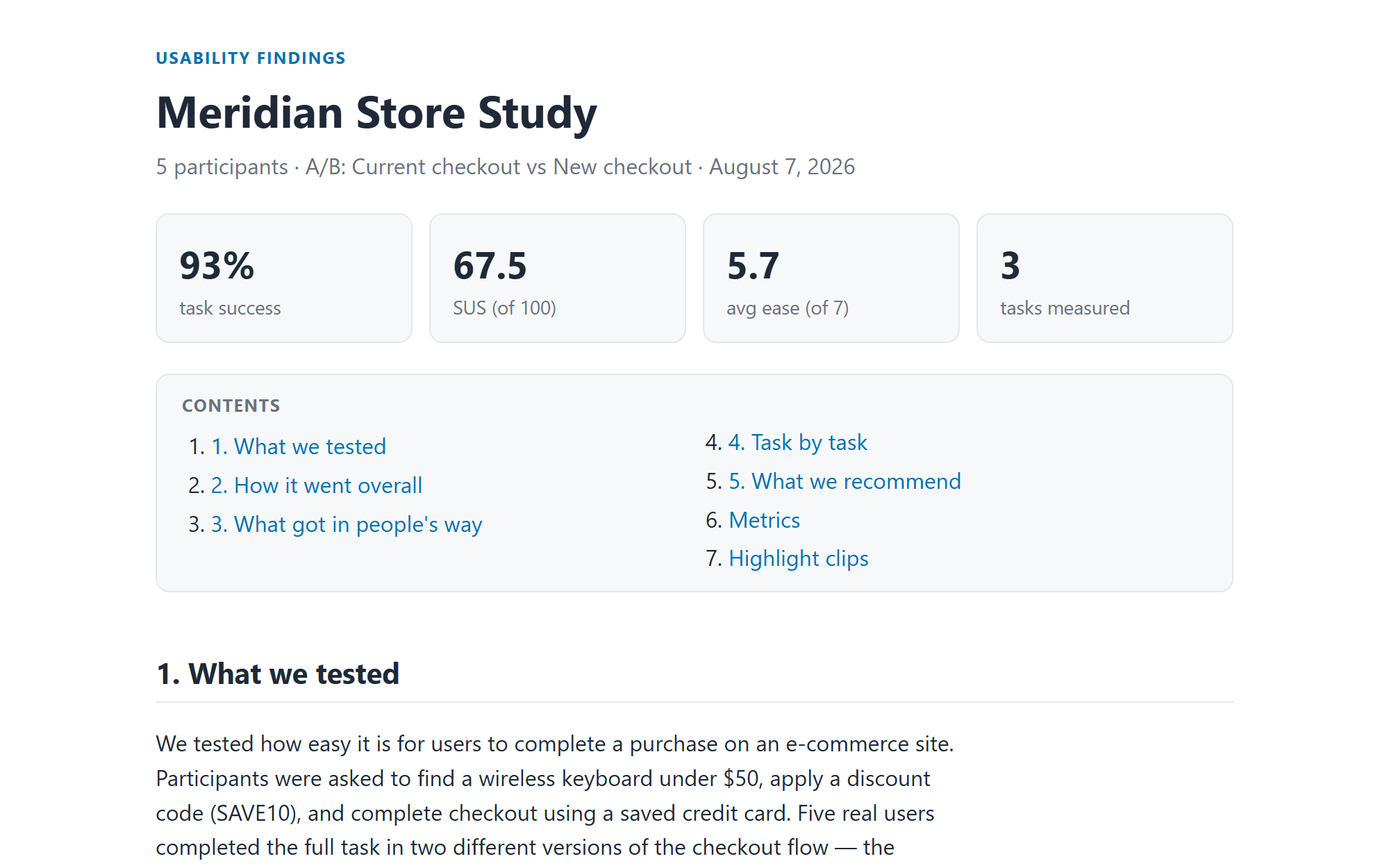
meridian-store-study — findings
The top of a findings report: the study name, five participants, an A/B comparison of two checkout designs, and four headline figures — 93% task success, SUS 67.5, average ease 5.7 of 7, three tasks measured — above a contents list and the opening section.
The report your stakeholders read. Plain language up top, the numbers stated once, and every claim below it cited back to the moment in the recording where it happened.
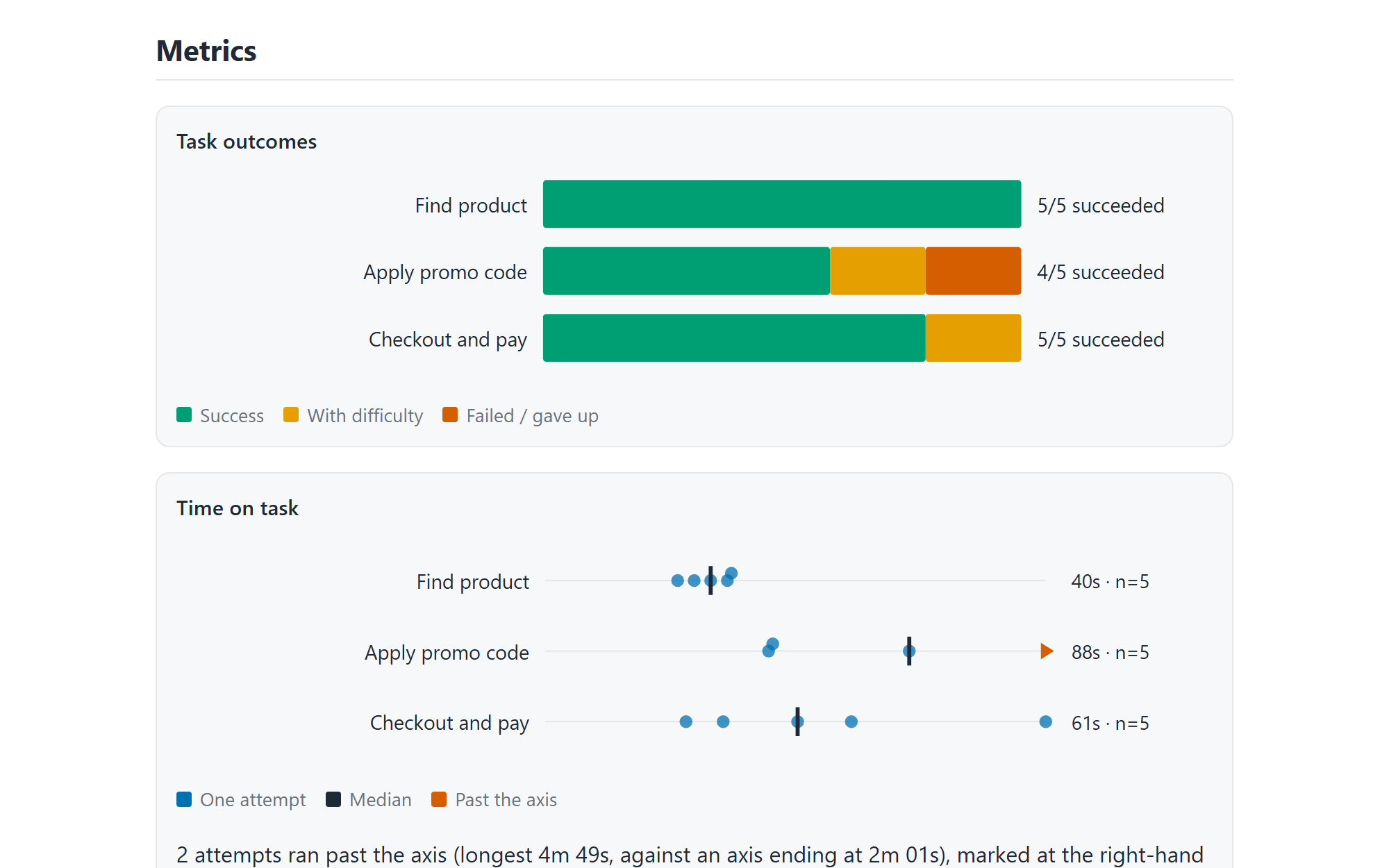
meridian-store-study — metrics
The metrics section of the same report: a task-outcomes chart showing successes, successes with difficulty and failures per task, and a time-on-task chart plotting every individual attempt as a dot with the median marked.
Measured, not asserted. Outcomes are scored against the study's own vocabulary, and time on task shows every attempt rather than a lone average — with anything past the axis named instead of hidden.
SAMPLE

AI findings report

A stakeholder-ready report from a demo study — plain-language findings up top, a researcher appendix with severities and scores beneath, every claim cited.

View the sample report →
SAMPLE

Demo study project

An example project you can open in Ovo Logger — sessions, notes, questionnaires, and highlights, so you can explore the review side hands-on.

Download the demo project →
SAMPLE

Highlight reel

A short cut of key moments assembled from a session — the kind of clip you'd drop into a readout to make a finding land.

Watch the clip →

03 / Docs & downloads

Everything to get started and evaluate.

Ovo Logger — installer

Self-contained Windows installer · per-user · no admin, no prerequisites

LATESTDownload

Spec sheet

One-page technical summary — sources, formats, security, licensing

Quick-start guide

From install to your first recorded, reviewed session

PDFOpen

Release notes

What's new in each version, and the upgrade path

🔒

Security & accessibility briefs

For IT, infosec, and procurement reviews

04 / Help

Help & documentation

Searchable how-to guides and reference for every part of Ovo Logger — the online counterpart to the in-app help: quick starts, running a session, review & AI analysis, licensing, accessibility, and troubleshooting.

Open the help →

Resources

Seen enough to want a closer look?

We'll run a real study end to end on your setup, or scope a quote — whichever moves you forward.